Reading time: 24 min
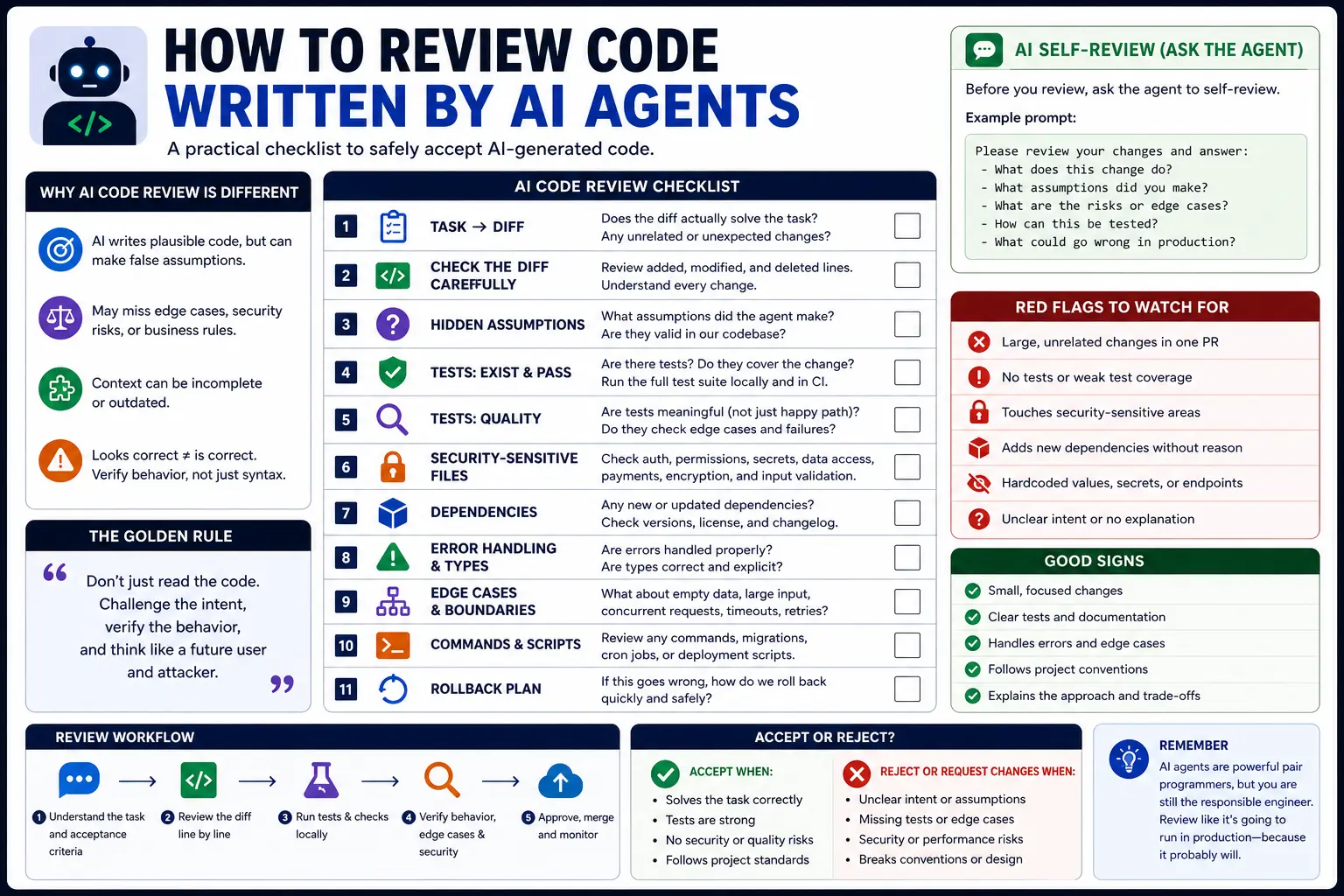
How to Review Code Written by AI Agents
A practical checklist for reviewing AI-generated code: diff review, tests, hidden assumptions, security-sensitive files, dependencies, edge cases, and rollback plans.
AI coding agents can write code faster than most teams can review it.
That is the new bottleneck.
The risky part of AI coding is not only generation. It is acceptance. A coding agent can produce a clean-looking diff, a confident summary, and a passing narrow test while still changing the wrong behavior, weakening type safety, missing edge cases, or touching a security-sensitive file you did not ask it to touch.
That means the developer’s job changes. You are not only reviewing code. You are reviewing an agent’s assumptions, tool use, scope control, tests, and hidden side effects.
This guide explains how to review code written by AI agents. It includes a practical review checklist, diff review process, test strategy, security-sensitive file checks, dependency review, edge case review, rollback planning, and examples you can use with Claude Code, Codex, Cursor, GitHub Copilot, or any other coding agent.
Why Reviewing AI-Generated Code Is Different
AI-generated code can fail in ways that are different from human-written code.
A human developer usually knows why they made a change, what they considered, and what trade-off they accepted. An AI agent may produce code that looks intentional but was actually the result of pattern matching, incomplete context, or a mistaken assumption.
Common AI-code failure modes:
- the code solves the example but not the real problem;
- the agent changes unrelated files;
- the agent removes edge-case handling it does not understand;
- the agent loosens types to make errors disappear;
- the agent updates tests to match broken behavior;
- the agent adds a dependency for a tiny task;
- the agent touches auth, billing, permissions, migrations, or CI without approval;
- the agent claims a check passed when it was not actually run;
- the final summary hides important risks.
A normal code review asks: “Is this code correct?”
An AI code review also asks: “Did the agent understand the task, stay in scope, verify the result, and avoid creating hidden risk?”
Start with the Task, Not the Diff
Before reading the diff, read the original task.
You need to know what the agent was asked to do before you can judge whether the change is good.
Check:
- What was the expected behavior?
- What files or areas were in scope?
- What was explicitly out of scope?
- Were tests required?
- Were risky areas forbidden?
- Did the agent have enough context?
- Did the task require planning before editing?
Bad task:
txtCopyFix the dashboard bug.
Better task:
txtCopyFix the dashboard status filter so the selected status persists in the URL query string.

Expected behavior:
- selecting a status updates `?status=`;
- reloading keeps the selected status;
- invalid values fall back to `all`.

Constraints:
- do not change dashboard layout;
- do not add dependencies;
- do not edit auth, billing, migrations, or CI;
- add or update a focused test.
If the task was vague, the review must be stricter. A vague prompt gives the agent more room to guess.
The AI Code Review Checklist
Use this checklist before accepting an agent-generated diff:
mdCopy## AI Code Review Checklist

### Scope
- [ ] The diff matches the requested task.
- [ ] No unrelated files were changed.
- [ ] No broad refactor was mixed into a bug fix.
- [ ] No new dependency was added without a strong reason.

### Correctness
- [ ] The code handles the expected behavior.
- [ ] Edge cases are covered.
- [ ] Existing behavior was not accidentally removed.
- [ ] The implementation follows nearby project patterns.

### Tests
- [ ] Relevant tests were added or updated.
- [ ] Tests protect behavior, not implementation details only.
- [ ] Tests were not weakened to make the diff pass.
- [ ] Typecheck, lint, build, or relevant test commands were run.

### Safety
- [ ] Auth, billing, permissions, migrations, CI, secrets, and environment files were not changed unexpectedly.
- [ ] No secrets were printed or logged.
- [ ] User input is validated where needed.
- [ ] External calls and tool usage are safe.

### Review
- [ ] The agent summary matches the actual diff.
- [ ] Assumptions are listed.
- [ ] Manual QA steps are clear.
- [ ] Rollback plan is obvious.
This checklist is intentionally practical. It is designed to catch the mistakes agents commonly make.
Step 1: Check the Diff Shape
Start with the shape of the diff before reading every line.
Useful commands:
bashCopygit diff --stat
git diff --name-only
git diff --check
Look for surprises:
- too many files changed;
- files outside the requested area;
- formatting-only changes mixed with logic changes;
- lockfile changes without an intentional dependency update;
- generated files changed unexpectedly;
- deleted tests;
- changes in high-risk folders.
A small task should usually produce a small diff.
If a one-line bug fix changed 17 files, pause the review. Ask why. The agent may have over-refactored.
Step 2: Compare the Diff Against the Task
AI agents often solve a nearby problem instead of the requested problem.
Ask:
- Does this diff implement the exact expected behavior?
- Did it preserve the constraints?
- Did it change product behavior that was not requested?
- Did it alter public API shape?
- Did it change database schema or data flow?
- Did it move logic to the right layer?
Example issue:
txtCopyPersist selected dashboard status in the URL.
Bad agent behavior:
- rewrites the entire dashboard state system;
- changes the visual design;
- adds a new state management library;
- removes pagination state;
- changes how filters are fetched from the server.
Good agent behavior:
- updates the status filter to read/write
?status=; - validates allowed status values;
- preserves layout;
- adds a focused test;
- keeps the diff small.
The best AI-generated code is usually boring. It solves the task without trying to prove how smart the agent is.
Step 3: Review Hidden Assumptions
AI agents make assumptions even when they do not say them out loud.
Common hidden assumptions:
- this field is always present;
- this API always returns a value;
- this list is never empty;
- this user has permission;
- this timezone does not matter;
- this code only runs in the browser;
- this code only runs on the server;
- this function is not used elsewhere;
- this type can be loosened safely;
- this error state does not need UI.
Ask the agent to list assumptions before review:
txtCopyBefore I review this diff, list every assumption you made. Include assumptions about data shape, permissions, runtime environment, tests, and existing behavior.
Do not make more edits.
Then compare the assumptions with the code.
If the agent assumed something important without proof, the diff needs more work.
Step 4: Check Tests Like a Reviewer, Not a Coverage Bot
A test is only useful if it protects behavior.
AI agents sometimes add tests that look good but do not catch real regressions.
Bad tests:
- only check that a component renders;
- assert implementation details;
- duplicate existing tests;
- update snapshots without explaining behavior;
- mock the bug away;
- test the happy path only;
- weaken assertions so the test passes.
Good tests:
- reproduce the bug;
- check user-visible behavior;
- cover edge cases;
- fail before the fix and pass after it;
- use existing project test patterns;
- protect the business rule that matters.
Example: if the agent fixed a URL filter bug, a useful test checks that selecting a filter updates the query string and that invalid values fall back to a safe default.
Example test shape:
tsxCopyit("falls back to all when the status query param is invalid", () => {
  expect(parseStatus("not-a-real-status")).toBe("all");
});

it("updates the URL when the user selects a status", async () => {
  const user = userEvent.setup();
  render(<StatusFilter />);

  await user.selectOptions(screen.getByLabelText(/status/i), "blocked");

  expect(replace).toHaveBeenCalledWith("/dashboard?status=blocked", { scroll: false });
});
Do not accept tests just because they exist. Check whether they would catch the bug if someone reintroduced it.
Step 5: Verify Commands Were Actually Run
Agent summaries are not enough. Check what was actually run.
Ask for command output when needed:
txtCopyList the exact commands you ran and their results. If a command was not run, say why. Do not claim a check passed unless it was executed.
Typical checks:
bashCopynpm run typecheck
npm run lint
npm test -- StatusFilter
npm run build
For backend projects, the commands may be different:
bashCopypytest
ruff check .
mypy .
go test ./...
cargo test
If the agent did not run checks, the human reviewer must decide whether to run them manually or ask the agent to run them before continuing.
A passing narrow test is not always enough. If the change touches shared code, run broader checks.
Step 6: Review Security-Sensitive Files
Some files should trigger automatic caution.
High-risk areas:
- authentication;
- authorization;
- permissions;
- billing;
- payments;
- database migrations;
- data deletion;
- encryption;
- token handling;
- environment config;
- CI/CD;
- deployment scripts;
- customer data exports;
- analytics used for billing or reporting.
If an AI-generated diff touches one of these areas, review it as high-risk even if the change looks small.
Questions to ask:
- Did the task explicitly require this file?
- Did the agent explain why it changed it?
- Is there a test or review covering the behavior?
- Could this expose data, weaken auth, or break billing?
- Is rollback possible?
- Should a human owner of that system review it?
A useful rule for AGENTS.md or project instructions:
mdCopy## High-risk files
Do not edit auth, billing, permissions, migrations, CI, deployment, or environment files unless the task explicitly asks for it.
If a change is required, explain why and request human review before editing.
Step 7: Review Dependencies
AI agents sometimes add dependencies because it is easier than using existing code.
A dependency change is not automatically wrong, but it deserves review.
Check:
- Was the dependency necessary?
- Is there already an internal utility that solves the problem?
- Is the package maintained?
- Is the license acceptable?
- Does it increase bundle size?
- Does it run on server, client, or both?
- Does it introduce security risk?
- Did the lockfile change intentionally?
- Is the dependency used in only one small place?
Bad pattern:
txtCopyAgent adds a new date library to format one date string, even though the project already has a date utility.
Better pattern:
txtCopyAgent uses the existing `formatDate` helper and adds a test for the new format behavior.
In most production codebases, dependency additions should require human approval.
Step 8: Check Types and Error Handling
AI-generated TypeScript can look clean while hiding type problems.
Watch for:
anyadded to silence errors;as unknown ascasts;- non-null assertions
!without proof; - optional chaining used to hide missing data;
- broad catch blocks that swallow errors;
- impossible states not handled;
- server-only code imported into client components;
- client-only code imported into server modules.
Bad example:
tsCopyconst user = response.user as any;
return user.profile.name;
Better example:
tsCopytype UserResponse = {
  user?: {
    profile?: {
      name?: string;
    };
  };
};

function getDisplayName(response: UserResponse) {
  return response.user?.profile?.name ?? "Unknown user";
}
The better version makes uncertainty visible instead of hiding it.
Step 9: Check Edge Cases
AI agents often optimize for the happy path.
Review edge cases deliberately.
For UI code:
- loading state;
- empty state;
- error state;
- mobile layout;
- keyboard navigation;
- invalid query params;
- slow network;
- duplicate submissions;
- hydration issues.
For backend code:
- missing fields;
- invalid input;
- permission denied;
- rate limits;
- retry behavior;
- idempotency;
- partial failures;
- timezone handling;
- concurrency;
- rollback behavior.
For data workflows:
- duplicate records;
- null values;
- stale data;
- conflicting sources;
- malformed input;
- low-confidence classification;
- human review path.
A good review prompt:
txtCopyReview this diff for edge cases. Focus on empty input, invalid input, permissions, retries, duplicate actions, loading/error states, and rollback. Do not modify files. Return a checklist of risks.
Step 10: Check the Agent Summary Against the Actual Diff
AI agents can write convincing summaries that omit important changes.
Compare the final summary with:
bashCopygit diff --stat
git diff --name-only
git diff
Look for mismatches:
- summary says “small UI change,” but shared utilities changed;
- summary says “tests added,” but only snapshots changed;
- summary says “no dependencies,” but lockfile changed;
- summary says “build passed,” but no output is shown;
- summary does not mention a high-risk file.
The summary is useful, but the diff is the source of truth.
Step 11: Require a Rollback Plan
For low-risk changes, rollback may simply mean reverting the commit.
For production-sensitive changes, ask for a rollback plan before merging.
Rollback questions:
- Can this be reverted cleanly?
- Is there a feature flag?
- Does this include a database migration?
- Is the migration reversible?
- Does the change affect user data?
- Are there background jobs or queues involved?
- Is there a monitoring signal after deploy?
- Who owns rollback if something breaks?
Example rollback note:
mdCopy## Rollback plan
- Revert this PR to restore previous filter behavior.
- No database migration was added.
- No dependency was added.
- Monitor dashboard filter error logs and user reports after deploy.
If the change touches migrations, billing, permissions, or customer data, rollback planning is not optional.
Example: Reviewing an AI-Generated Refactor
Imagine the task was:
txtCopyMove dashboard filter URL parsing into a shared utility.
The agent changed:
txtCopycomponents/dashboard/StatusFilter.tsx
lib/url-state.ts
components/billing/BillingTabs.tsx
tests/url-state.test.ts
package-lock.json
Review observations:
StatusFilter.tsxandlib/url-state.tsare expected.BillingTabs.tsxmay be expected if it uses the shared utility, but the task should justify it.tests/url-state.test.tsis good if it covers behavior.package-lock.jsonis suspicious unless a dependency was intentionally added.
Questions:
- Why did the lockfile change?
- Did the refactor preserve existing billing tab behavior?
- Did tests cover both dashboard and billing cases?
- Did the utility validate unknown query params?
- Did the agent change routing behavior or only extraction logic?
This is how you review the shape before diving into every line.
Example: Agent Self-Review Prompt
Before you review the code yourself, make the agent review its own diff.
Prompt:
txtCopyReview your own diff before I review it.

Return:
1. Every file changed and why.
2. Any file that might be out of scope.
3. Tests added or updated.
4. Commands run and results.
5. Assumptions you made.
6. Edge cases not covered.
7. Security-sensitive areas touched.
8. Rollback plan.

Do not make more edits unless you find a clear blocker.
This does not replace human review. It makes the human review faster because the agent has to expose its reasoning and risk areas.
Example: Custom Instructions for AI Code Review
You can put review expectations in project guidance so agents start with the right standards.
For Codex, OpenAI recommends making reusable guidance available through AGENTS.md. GitHub Copilot code review can also be customized with repository instructions in .github/copilot-instructions.md.
Example AGENTS.md section:
mdCopy## AI code review rules
- Keep diffs small and scoped.
- Do not edit high-risk files unless the task explicitly asks for it.
- Add or update tests for behavior changes.
- Do not use `any` to hide TypeScript errors.
- Do not add dependencies without explanation.
- Before finishing, report files changed, checks run, assumptions, risks, and manual QA.
Example Copilot instructions:
mdCopy# Copilot Code Review Instructions

When reviewing pull requests:
- Check whether the diff matches the issue.
- Flag missing tests for behavior changes.
- Flag changes to auth, billing, permissions, migrations, CI, or environment files.
- Flag new dependencies and lockfile changes.
- Look for type loosening, broad catches, and hidden assumptions.
- Prefer actionable comments with specific file/line references.
This does not make AI review perfect, but it makes it more consistent.
Human Review Still Matters
AI review tools are useful, but they are not a replacement for ownership.
Claude Code’s code review documentation describes AI reviews that analyze diffs and surrounding code, and GitHub Copilot code review can be customized with repository instructions. These tools can catch issues, but the developer is still responsible for what gets merged.
Use AI review as a second reviewer, not the final authority.
A practical review stack:
- Agent self-review.
- Automated tests and static checks.
- AI review tool if available.
- Human review of diff, tests, assumptions, and risk.
- Manual QA for user-facing behavior.
- Rollback plan for production-sensitive changes.
The order matters. AI review is helpful, but it should not create false confidence.
The Final Accept-or-Reject Checklist
Before accepting AI-generated code, answer yes to these:
- Did the diff solve the requested task?
- Is the diff small enough to review?
- Are unrelated changes absent or justified?
- Are tests meaningful?
- Were checks run or explicitly skipped with a reason?
- Are hidden assumptions acceptable?
- Are high-risk files untouched or properly reviewed?
- Are dependencies unchanged or justified?
- Are edge cases handled?
- Is rollback clear?
- Do you understand the code well enough to own it?
The last question is the most important.
If you do not understand the AI-generated code well enough to maintain it, do not merge it.
Conclusion: Review the Agent, Not Just the Code
AI coding changes the review process.
You still review correctness, readability, tests, and maintainability. But you also review the agent’s scope control, assumptions, tool use, dependency choices, and validation claims.
A good AI code review starts with the task, inspects the diff shape, checks tests, looks for hidden assumptions, protects security-sensitive files, verifies commands, examines dependencies, tests edge cases, and requires rollback thinking.
The goal is not to block AI-generated code. The goal is to make AI-generated code safe to accept.
Treat every agent-generated diff like work from a very fast developer who may have misunderstood the assignment. Review accordingly.