Reading time: 23 min
From Prompt Engineering to Agent Skills
A practical tutorial on moving from one-off prompts to reusable agent skills for coding, SEO, article review, QA, and business workflows.
The old way of working with AI was simple: write a prompt, get an answer, edit the result, and paste a slightly improved prompt next time.
That works for one-off tasks. It does not work well for repeated professional workflows.
If you keep asking an AI to review articles with the same checklist, audit landing pages with the same criteria, write tests using the same project rules, or check code diffs with the same review process, you should probably stop rewriting prompts and start building skills.
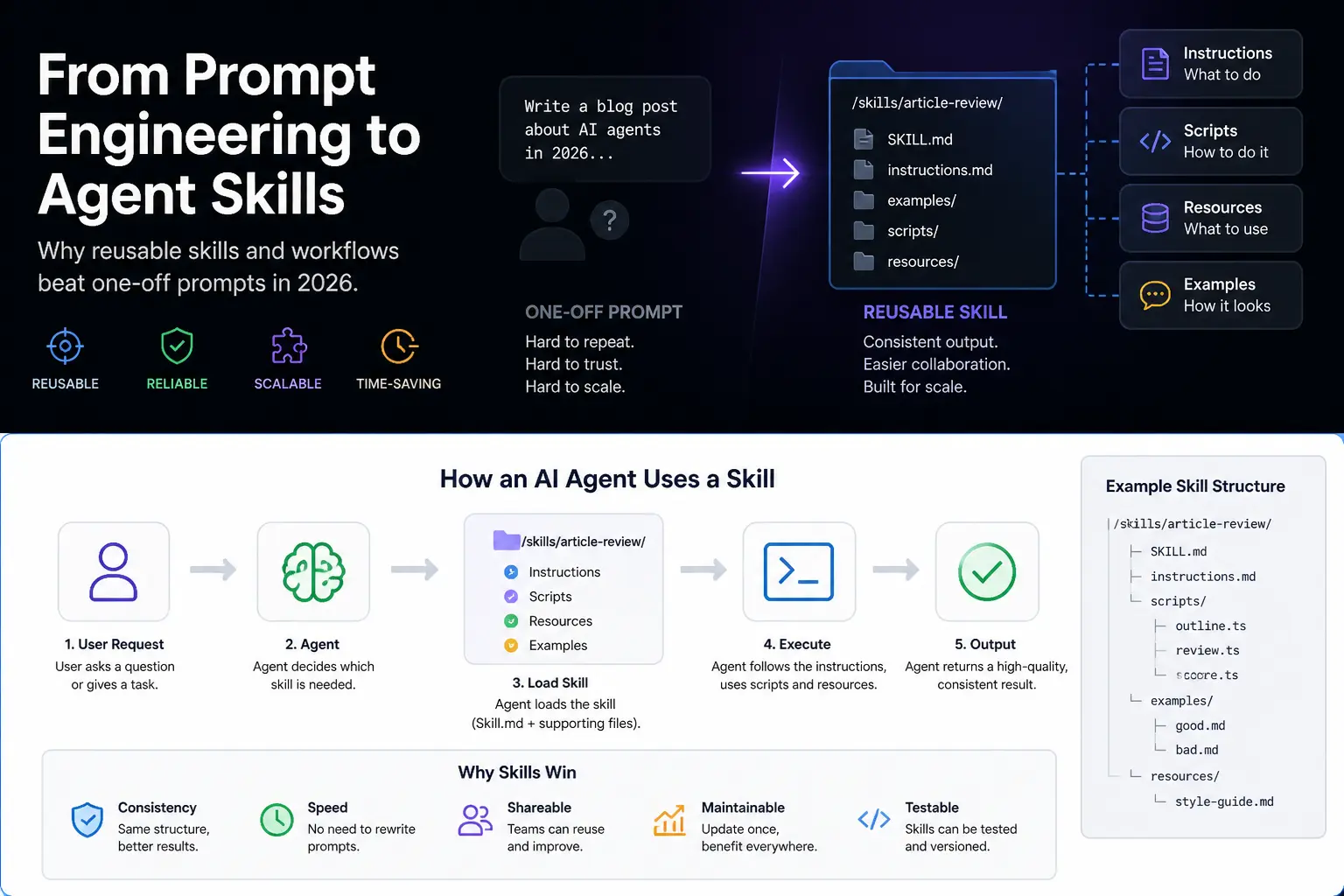
A skill is a reusable workflow for an AI agent. Instead of pasting the same instructions into every session, you package the procedure, rules, resources, examples, scripts, and quality checks into a folder the agent can discover and use when the task appears.
OpenAI describes Codex skills as an authoring format for reusable workflows, while Anthropic describes Claude skills as folders with a SKILL.md file plus optional scripts and resources. The terminology may vary across tools, but the shift is the same: AI work is moving from one-off prompts to reusable agent capabilities.
This article explains how to move from prompt engineering to agent skills. We will cover prompt vs skill, what belongs inside a skill, when to create one, when a normal prompt is enough, how to structure SKILL.md, and practical examples for coding, SEO, content review, QA, and landing page audits.
Prompt vs Skill
A prompt is a one-time instruction. A skill is a reusable procedure.
A prompt says:
txtCopyReview this article and make it better.
A skill says:
txtCopyWhen reviewing an article, follow our editorial checklist, check search intent, inspect structure, flag weak sections, preserve formatting rules, suggest concrete rewrites, and return the output in a specific format.
The difference is not only length. The difference is repeatability.
| Question | Prompt | Skill |
|---|---|---|
| Best for | One-off task | Repeated workflow |
| Stored where | Chat message | Versioned folder/file |
| Includes examples | Usually pasted manually | Bundled with the skill |
| Includes scripts | Rarely | Often possible |
| Reused across sessions | No | Yes |
| Easy to share with team | Not really | Yes |
| Good for quality control | Weak | Stronger |
A prompt can be excellent for exploration. A skill is better when the task has a stable process.
Why Prompts Break Down
Prompts break down when the workflow becomes bigger than the chat message.
Common symptoms:
- you paste the same checklist every day;
- the prompt keeps growing with edge cases;
- different team members use different versions;
- the AI forgets formatting rules;
- examples are missing or outdated;
- the output quality changes from session to session;
- you rely on memory instead of a versioned process;
- the workflow needs files, scripts, templates, or test cases.
At that point, the problem is no longer prompt wording. The problem is workflow packaging.
Skills solve this by turning repeated work into a reusable asset.
What Goes Inside a Skill
A good skill can contain several parts.
-
Instructions
What the agent should do, what order to follow, what to avoid, and what quality bar to use. -
Resources
Reference files, checklists, style guides, templates, examples, scoring rubrics, or project rules. -
Scripts
Optional helper scripts for tasks like validation, formatting, linting, extraction, file conversion, tests, or report generation. -
Examples
Good and bad examples that show the expected output. -
Output format
The exact structure the agent should return. -
Review rules
What the human should check before accepting the result.
At minimum, a skill usually has a SKILL.md file. More advanced skills add folders for examples, templates, scripts, and resources.
A Simple Skill Folder Structure
A basic skill can look like this:
txtCopyskills/
  article-review/
    SKILL.md
    examples/
      strong-intro.md
      weak-intro.md
    resources/
      editorial-checklist.md
      seo-rules.md
  code-review/
    SKILL.md
    resources/
      review-rubric.md
  landing-page-audit/
    SKILL.md
    templates/
      audit-report.md
    resources/
      conversion-checklist.md
The exact location depends on your tool and setup. The important part is the pattern: each skill is a folder, and the SKILL.md explains when and how the skill should be used.
Anatomy of a SKILL.md
A practical SKILL.md should be short enough to load quickly and specific enough to guide behavior.
Example structure:
mdCopy---
name: article-review
description: Review blog articles for search intent, structure, clarity, examples, formatting, and editorial quality.
---

# Article Review Skill

Use this skill when the user asks to review, improve, rewrite, or audit a blog article.

## Goals
- Make the article more useful for the reader.
- Strengthen search intent alignment.
- Remove generic AI-style writing.
- Preserve project formatting rules.
- Suggest concrete rewrites, not vague advice.

## Process
1. Identify the main search intent.
2. Check whether the opening is specific.
3. Find weak or generic sections.
4. Check examples, tables, and practical steps.
5. Check formatting rules.
6. Suggest edits by priority.

## Output
Return:
1. Summary of the article's current problem.
2. High-priority fixes.
3. Section-by-section notes.
4. Suggested rewritten title and description.
5. Final checklist before publishing.

## Do not
- Do not add fake facts.
- Do not promise AdSense earnings.
- Do not change the article format unless requested.
- Do not use generic advice like 'add value' without explaining how.
This is already much better than a long prompt pasted into chat every time.
Bad Prompt vs Good Skill
Bad prompt:
txtCopyMake this article better and SEO optimized.
Why it fails:
- no target reader;
- no search intent;
- no formatting rules;
- no quality bar;
- no examples;
- no output structure;
- no definition of what 'better' means.
Better prompt:
txtCopyReview this article for one search intent: AI CRM automation for sales teams.
Check the title, opening, structure, examples, risks, tables, and conclusion.
Preserve the articles.ts body format.
Return concrete edits and explain which sections are weak.
Better skill:
txtCopyUse the article-review skill.
Review this article against our editorial checklist and formatting rules.
Flag weak sections, suggest a stronger structure, and return a rewritten articles.ts object only if requested.
The skill wins because the procedure is stored, repeatable, and easier to improve over time.
When a Skill Is Worth Creating
Create a skill when the workflow is repeated, structured, and quality-sensitive.
Good candidates:
- article review;
- code review;
- landing page audit;
- SEO metadata check;
- test generation;
- release note generation;
- CRM lead summary;
- support ticket triage;
- QA checklist;
- data cleaning report;
- design critique;
- prompt-to-production formatting rules.
A skill is especially useful when:
- the task has the same checklist every time;
- you need consistent output;
- multiple people will use it;
- the task has examples or templates;
- mistakes are expensive;
- the prompt is getting too long;
- the workflow needs scripts or validation.
A skill is not worth creating for every tiny task. If the task is rare, exploratory, or unclear, use a normal prompt.
When a Normal Prompt Is Enough
Use a normal prompt when:
- the task is one-time;
- you are brainstorming;
- requirements are still changing;
- the answer does not need a fixed format;
- the task does not need reusable examples;
- the output is low-risk;
- the workflow is not yet understood.
For example, use a prompt for:
- 'Give me five title angles for this article.'
- 'Explain this error message.'
- 'Summarize this meeting note.'
- 'Compare these two headline ideas.'
Do not over-engineer. Build a skill only after you understand the repeated workflow.
Skill Example 1: Article Review
Folder:
txtCopyskills/article-review/SKILL.md
Example SKILL.md:
mdCopy---
name: article-review
description: Review and improve technical blog articles for clarity, search intent, structure, examples, and formatting.
---

# Article Review Skill

## When to use
Use this skill when reviewing or rewriting a blog article.

## Review checklist
- Is there one clear search intent?
- Does the opening start with a specific scenario?
- Is the title concrete and non-clickbait?
- Does the article include practical workflows or examples?
- Are risks and limitations explained?
- Are claims cautious and supportable?
- Are internal links relevant?
- Are code blocks and Markdown formatting preserved?

## Rewrite priorities
1. Strengthen the opening.
2. Replace generic claims with examples.
3. Add workflow sections.
4. Add tables only where they help decisions.
5. Add risks, constraints, and human review.
6. Improve conclusion with a practical first step.

## Output format
Return:
- current weakness;
- recommended new angle;
- updated title;
- updated SEO description;
- section outline;
- rewrite notes.

Do not fabricate sources or statistics.
This skill turns your editorial standards into a repeatable workflow.
Skill Example 2: Code Review
Folder:
txtCopyskills/code-review/SKILL.md
Example:
mdCopy---
name: code-review
description: Review the current code diff for correctness, safety, tests, type safety, and unrelated changes.
---

# Code Review Skill

## When to use
Use this skill when reviewing code written by a human or AI agent.

## Process
1. Inspect changed files.
2. Identify the purpose of the change.
3. Look for unrelated edits.
4. Check type safety.
5. Check missing tests.
6. Check security-sensitive areas.
7. Check whether the diff matches the task.

## High-risk files
Flag changes to:
- auth;
- billing;
- payments;
- database migrations;
- permissions;
- environment config;
- CI/CD;
- secrets;
- analytics used for billing or reporting.

## Output
Return findings by severity:
- blocker;
- major;
- minor;
- question;
- suggested test.

Do not modify files unless explicitly asked.
This is useful because AI-generated code often looks plausible. A review skill forces the agent to inspect the diff with a consistent checklist.
Skill Example 3: Landing Page Audit
Folder:
txtCopyskills/landing-page-audit/SKILL.md
Example:
mdCopy---
name: landing-page-audit
description: Audit a landing page for positioning, conversion clarity, UX, trust, performance, SEO, and accessibility.
---

# Landing Page Audit Skill

## When to use
Use this skill when reviewing a landing page, SaaS page, service page, or portfolio landing page.

## Audit areas
- hero clarity;
- audience and offer;
- call to action;
- visual hierarchy;
- trust signals;
- social proof;
- pricing clarity;
- mobile readability;
- performance risks;
- accessibility;
- SEO metadata;
- analytics and conversion events.

## Output format
1. One-sentence diagnosis.
2. Highest-impact fixes.
3. Section-by-section audit.
4. Copy suggestions.
5. UX/design notes.
6. Technical SEO notes.
7. Final prioritized checklist.

Do not suggest fake testimonials, fake logos, or misleading claims.
This skill is useful because landing page feedback can easily become vague. The checklist keeps the review practical.
Skill Example 4: QA Checklist
Folder:
txtCopyskills/frontend-qa/SKILL.md
Example:
mdCopy---
name: frontend-qa
description: QA a frontend feature across desktop, mobile, accessibility, loading states, errors, and edge cases.
---

# Frontend QA Skill

## Process
Check:
- desktop layout;
- mobile layout;
- keyboard navigation;
- loading states;
- empty states;
- error states;
- form validation;
- URL state;
- scroll behavior;
- hydration issues;
- console errors;
- build errors.

## Commands
Use project commands from AGENTS.md or CLAUDE.md.
If commands are missing, ask for the validation workflow.

## Output
Return:
- tested areas;
- issues found;
- reproduction steps;
- suggested fix;
- remaining manual checks.
A QA skill helps agents stop acting like the feature is done just because the code compiles.
Skill Example 5: SEO Metadata Check
Folder:
txtCopyskills/seo-metadata-check/SKILL.md
Example:
mdCopy---
name: seo-metadata-check
description: Review article metadata, title, description, slug, canonical, Open Graph, JSON-LD, and internal linking.
---

# SEO Metadata Check Skill

## Check
- title matches search intent;
- SEO title is under 60 characters when practical;
- description is 140-160 characters when practical;
- slug is readable and stable;
- article has one H1 on the page;
- body does not start with duplicate H1;
- Open Graph fields are present;
- canonical URL is correct;
- JSON-LD is valid;
- internal links are relevant;
- no meta keywords tag is emitted in HTML.

## Output
Return a table with:
- field;
- current value;
- issue;
- recommended value.
This is the kind of repeated editorial QA that should not be rewritten from memory every time.
Skills for Codex vs Claude
Codex and Claude both support the idea of reusable skills, but you should still check each tool’s current documentation for exact packaging and installation details.
At a high level:
- Codex skills are positioned by OpenAI as reusable workflows that can be authored as skills and distributed as plugins when needed.
- Claude skills are described by Anthropic as folders with a
SKILL.mdfile and optional bundled files such as scripts and resources. - AGENTS.md / CLAUDE.md / project rules are better for stable project facts and instructions.
- Skills are better for repeatable procedures.
A simple rule:
txtCopyProject facts → AGENTS.md, CLAUDE.md, repo rules
Repeated procedure → skill
One-time task → prompt
Do not put everything into a skill. Stable project conventions belong in project instructions. A skill should teach the agent how to perform a recurring workflow.
How to Build Your First Skill
Do not start by inventing a perfect skill system. Start from a prompt that already worked.
A practical process:
-
Find a repeated task
Example: reviewing article drafts before publishing. -
Collect your best prompt
Use the prompt that produced the best result. -
Extract the checklist
Turn the prompt into ordered steps. -
Add examples
Include one strong example and one weak example. -
Define output format
Make the result consistent. -
Add constraints
State what the agent must not do. -
Test on three real cases
Run it against different tasks and compare output. -
Revise the skill
Remove vague instructions and add missing edge cases. -
Version it
Keep it in Git if it affects real work.
The first version can be short. The goal is repeatability, not perfection.
Testing a Skill
Skills need testing because they can quietly produce bad habits at scale.
Test a skill with:
- an easy case;
- a normal case;
- a messy case;
- a case where the skill should refuse or escalate;
- a case with missing information;
- a case with formatting constraints.
For an article review skill, test:
- a strong article that needs only light edits;
- a weak article with generic claims;
- an article with code blocks that must preserve formatting;
- an article with unsupported factual claims;
- an article that has no clear search intent.
A useful skill test table:
| Test case | Expected behavior | Pass/fail |
|---|---|---|
| Strong article | Suggest small improvements only | |
| Weak article | Recommend structural rewrite | |
| Missing facts | Ask for sources or mark uncertainty | |
| Code formatting | Preserve code blocks and escaping rules | |
| Unsafe claim | Flag and remove unsupported promise |
If the skill fails on common cases, fix the skill before using it in production work.
Skills Are Not Magic
Skills do not remove the need for judgment.
A skill can make an agent more consistent, but it can also make the same mistake consistently if the instructions are wrong.
Common skill failure modes:
- outdated resources;
- vague descriptions;
- too many instructions;
- examples that no longer match the desired output;
- missing refusal rules;
- scripts that fail silently;
- no human review step;
- no tests for edge cases.
This is why important skills should be reviewed like code.
A skill that reviews articles can affect your brand. A skill that reviews code can affect production. A skill that handles CRM or support workflows can affect customers.
Skills are reusable power. Reusable power needs review.
How to Improve Skills Over Time
After using a skill, keep notes:
- What did the agent miss?
- What did it overdo?
- Which instruction was unclear?
- Which output format was annoying?
- Which example helped?
- Which resource was outdated?
- Did the skill choose itself at the right time?
- Did it need a human approval step?
Then update the skill in small changes.
Do not turn SKILL.md into a 5,000-word manual. If the skill needs more material, move examples and reference material into separate files and keep the main instructions focused.
Practical Skill Set for an AI Blog
For an AI blog project, a useful starter skill library might be:
txtCopyskills/
  article-review/
    SKILL.md
  article-rewrite/
    SKILL.md
  seo-metadata-check/
    SKILL.md
  image-brief/
    SKILL.md
  code-review/
    SKILL.md
  articles-ts-formatting/
    SKILL.md
  internal-linking/
    SKILL.md
The articles-ts-formatting skill could store project-specific rules like:
mdCopy---
name: articles-ts-formatting
description: Format blog article objects for the project's articles.ts file without breaking Markdown rendering.
---

# articles.ts Formatting Skill

## Rules
- `body` must be a string array.
- Each string can be a paragraph, heading, list, table, image, or code block.
- Use single `
` line breaks inside strings.
- Never output double-escaped newline sequences inside article body strings.
- Preserve fenced code blocks.
- Escape quotes only when required by TypeScript string syntax.
- Do not add duplicate H1 headings inside body.

## Final check
Before returning, verify:
- no double-escaped newline sequences;
- code blocks are fenced correctly;
- lists use Markdown line breaks;
- image paths match the article folder.
That kind of project-specific skill can prevent the same formatting bug from happening again.
Conclusion: The Future Is Reusable Workflow, Not Longer Prompts
Prompt engineering is still useful, but repeated professional work needs more structure.
If you only need one answer, write a prompt. If you need the same process again and again, build a skill.
A good skill captures the procedure, examples, resources, scripts, constraints, and output format that make an AI agent useful in a specific workflow.
The best teams will not win by having one giant prompt. They will win by turning their best workflows into reusable, reviewable, versioned skills.
Start with one repeated task. Build one SKILL.md. Test it on real examples. Improve it. Then reuse it every time the workflow appears.