Reading time: 18 min
Custom AI Agents with MCP: From Chatbot to Business Workflow
A practical guide to designing custom AI agents with MCP, business workflows, tool integrations, human approval, governance, and measurable ROI.
A sales team does not need another chatbot that explains what a CRM is. It needs a system that can read a new lead, check whether the company already exists in the CRM, enrich the account, draft a short sales brief, assign the right owner, and stop before making risky changes without approval.
That is the real difference between a chatbot and a custom AI agent. A chatbot mostly answers inside a conversation. A business workflow agent uses context, calls tools, follows rules, produces a record of what happened, and hands off uncertain decisions to a person.
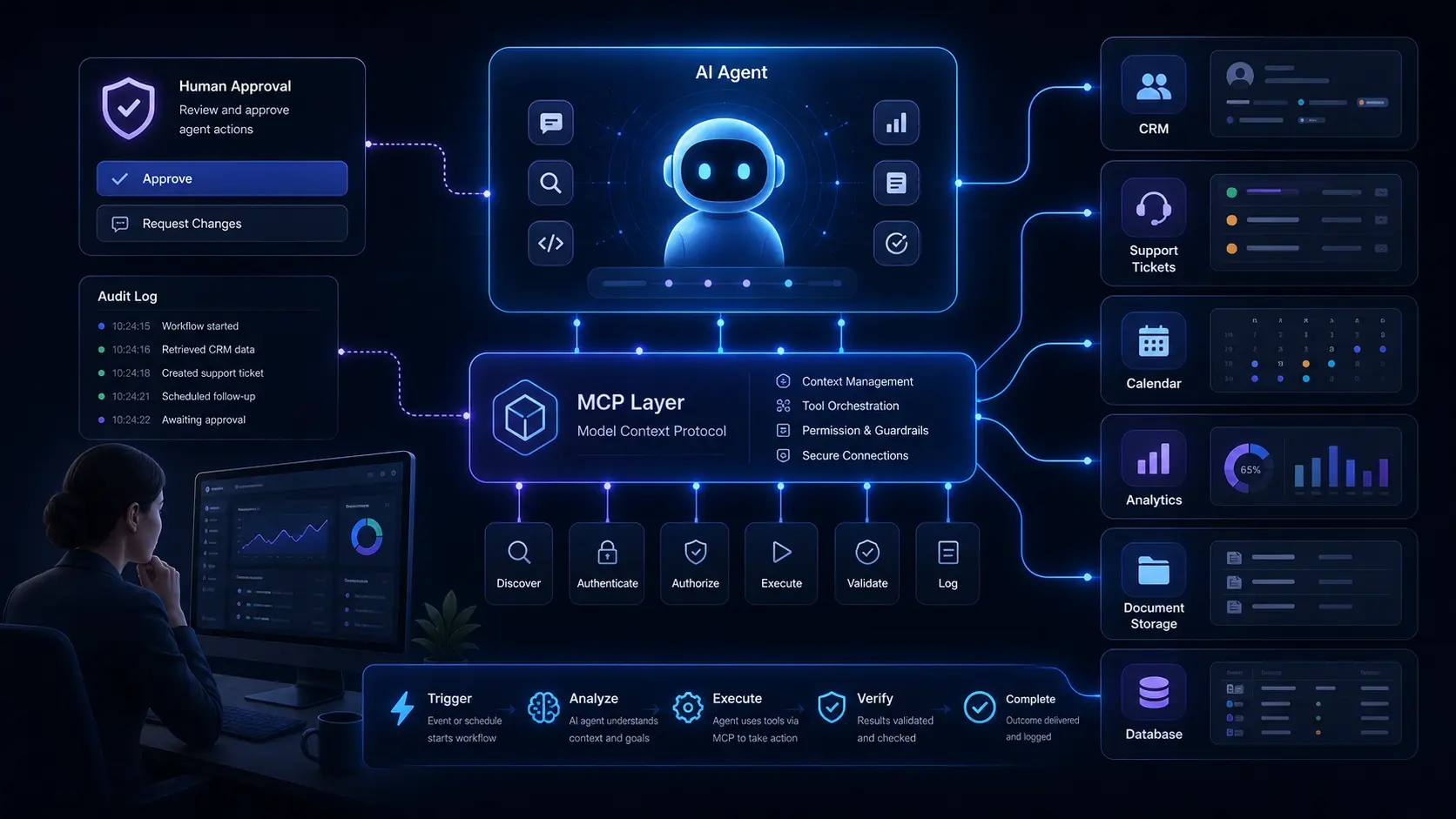
This is where the Model Context Protocol matters. MCP gives AI applications a standard way to connect with external systems through tools, resources, and reusable prompts. In business terms, an MCP server can expose controlled access to CRMs, databases, calendars, file storage, internal documentation, support systems, reporting APIs, and custom admin tools.
The goal is not to give an AI model unlimited access to company software. The goal is to design a narrow workflow where the agent has enough context to be useful, enough permissions to act, and enough guardrails to avoid silent damage.
This article explains how businesses can build custom AI agents with MCP without turning the project into a fragile demo. We will look at architecture, workflow selection, tool design, approval steps, ROI, security, and the mistakes that usually make enterprise AI automation fail.
Why Chatbots Are Not Enough for Business Automation
Most business work does not happen in a blank chat window. It happens across CRMs, spreadsheets, email threads, ticketing systems, calendars, dashboards, internal docs, and small admin tools that were never designed to work together.
A chatbot can answer a question about a process. A workflow agent can participate in the process.
For example, a basic chatbot might answer: 'To qualify a lead, check company size, industry, budget, and urgency.' That is useful, but it still leaves the work to the sales team. A custom AI agent can inspect the submitted form, search the CRM, summarize the company, flag missing data, prepare a qualification note, and route the lead to the correct queue.
The difference is not only intelligence. The difference is connection to systems.
This is why many AI projects disappoint after the first demo. The model can write, summarize, classify, and reason, but the workflow still depends on a person copying information between tools. Unless the agent can safely read context and trigger controlled actions, the business gets a better assistant, not real automation.
What MCP Adds to an AI Agent
MCP is useful because it separates the AI application from the business systems it needs to use. Instead of hard-coding every integration into one assistant, a team can expose specific tools, resources, and reusable prompts through MCP servers.
A simple way to think about it:
- Tools are actions the agent can call, such as
lookupLead,createDraftTicketResponse,searchInvoices, orgetCalendarAvailability. - Resources are contextual data the agent can read, such as docs, schemas, records, files, policies, or structured business information.
- Prompts are reusable workflows or templates that help the agent perform a task consistently.
This matters because business software needs boundaries. A good MCP server does not expose the entire database. It exposes small, named capabilities that match the workflow.
Bad tool design gives the agent a generic runSQL function and hopes the model behaves. Better tool design gives the agent focused actions: findDuplicateLead, summarizeOpenDeals, draftFollowUpEmail, getSupportHistory, or prepareRefundRequest.
The second version is easier to monitor, easier to test, easier to secure, and easier to explain to a business owner.
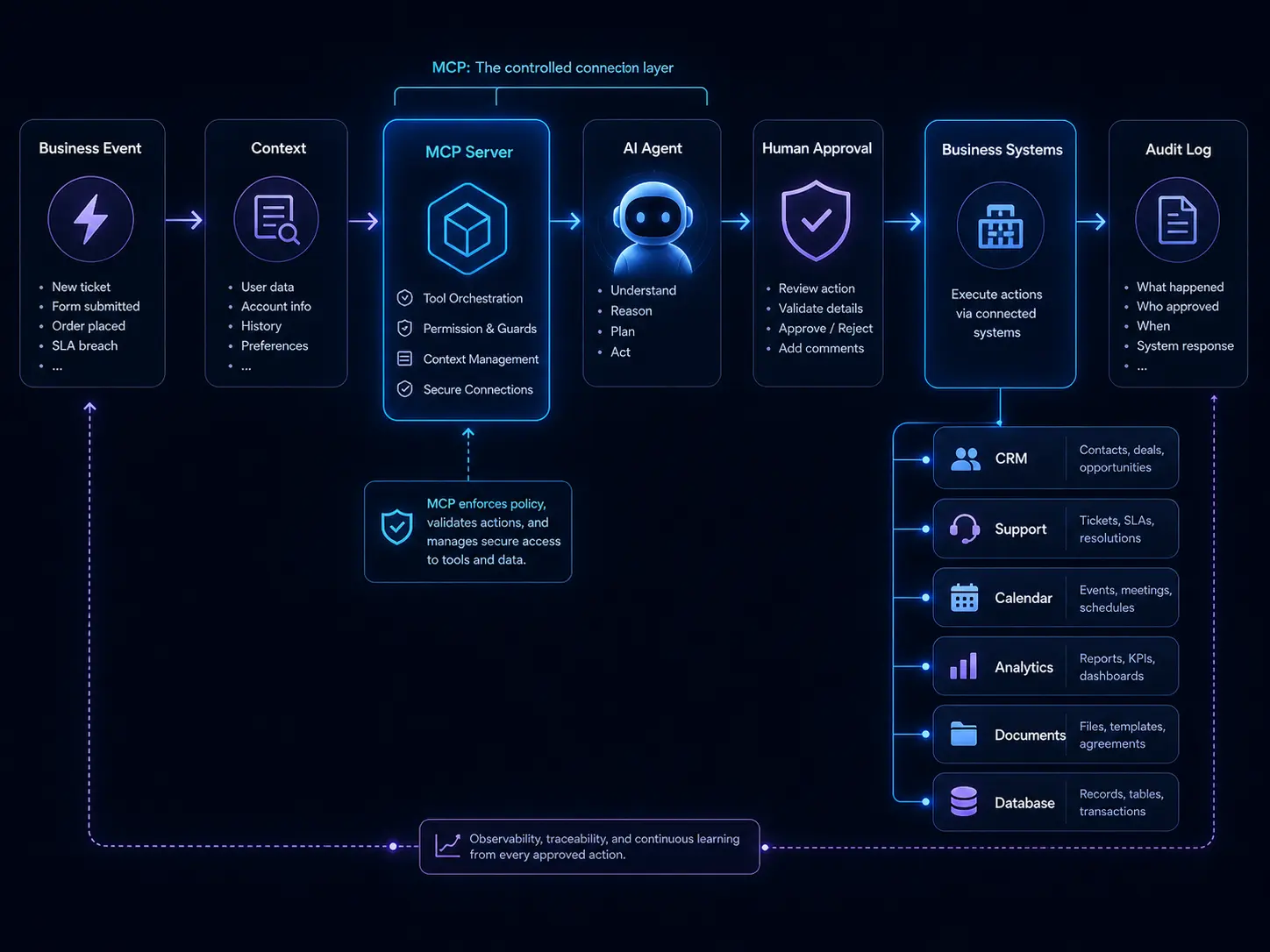
 Architecture of a custom AI agent using MCP tools, approval steps, and business systems.
A Practical MCP Agent Architecture
A useful business agent usually has five layers.
-
Business trigger
Something starts the workflow: a new lead, a support ticket, a missed call, a document upload, a weekly report cycle, or a manual request from a team member. -
Context layer
The agent receives the minimum context needed to understand the task. This can include the submitted form, CRM record, customer history, product documentation, policy rules, or previous conversation. -
MCP tool layer
The agent uses MCP tools to query or prepare actions in business systems. These tools should be narrow, named, logged, and permissioned. -
Decision and approval layer
The agent classifies the task, drafts outputs, and decides whether it can continue. Risky actions should require human approval before anything is written to production systems. -
Output and audit layer
The result is saved somewhere useful: a CRM note, ticket summary, report, dashboard item, email draft, task assignment, or approval queue. The system should also log what the agent saw, what tools it called, and what it changed.
In plain English, the architecture looks like this:
Business event → context → MCP server → agent reasoning → approval step → business system update → audit log
That approval step is not optional for serious workflows. It is what separates a useful internal tool from an automation risk.
Example: A Revenue Operations Agent
Imagine a B2B company that receives hundreds of inbound leads every week. A human operator currently opens each form submission, checks the company website, searches the CRM for duplicates, looks at previous conversations, estimates account quality, and decides whether the lead should go to sales, nurture, or support.
The work is repetitive, but it still requires judgment. This makes it a good candidate for an AI workflow agent, not a fully autonomous black box.
An MCP-based revenue operations agent could follow this workflow:
- Read a new lead submission.
- Use
findCompanyByDomainto check for existing CRM records. - Use
getRecentInteractionsto summarize previous activity. - Use
enrichCompanyProfileto collect structured company data. - Classify the lead as sales-ready, nurture, support, partner, or spam.
- Draft a CRM note with evidence.
- Recommend an owner and next step.
- Ask for approval if the lead is high-value, ambiguous, or already attached to an active deal.
The agent should not silently overwrite customer data. It should not invent company facts. It should not change deal stages without a rule. Its job is to reduce manual research, make routing more consistent, and give the sales team a better starting point.
The business value is measurable: faster response time, fewer duplicate records, cleaner CRM data, better lead routing, and less admin work for sales operations.
Chatbot vs Workflow Agent
| Question | Chatbot | Custom workflow agent |
|---|---|---|
| Main job | Answer questions | Complete a defined business process |
| Context | User-provided text | User input plus business system data |
| Tools | Often none or generic | Narrow MCP tools with permissions |
| Output | Message in chat | CRM note, ticket draft, report, task, approval request |
| Risk level | Usually low | Depends on tool access and write permissions |
| Best use | Explanation, brainstorming, simple help | Repeatable workflows with measurable outcomes |
This comparison matters when choosing the first project. If the task only requires explanation, a chatbot may be enough. If the task requires reading systems, preparing actions, routing work, and recording outputs, the business needs a workflow agent.
How to Choose the First Workflow
The first AI automation project should not be the most impressive idea. It should be the most controllable valuable workflow.
Good candidates usually have these traits:
- the task happens often;
- the input format is somewhat predictable;
- the business systems are known;
- the result can be reviewed;
- the cost of an error is manageable;
- there is a clear before-and-after metric.
Weak candidates usually have the opposite traits: rare tasks, unclear ownership, messy data, high legal or financial risk, and no obvious way to measure success.
A simple scoring table helps:
| Workflow | Frequency | Error risk | Data access | Measurable value | Good first project? |
|---|---|---|---|---|---|
| Support ticket triage | High | Medium | Easy | High | Yes |
| CRM lead enrichment | High | Medium | Medium | High | Yes |
| Refund approval | Medium | High | Medium | High | Not first |
| Legal contract decisions | Low | High | Hard | Medium | Not first |
| Weekly operations report | High | Low | Medium | Medium | Yes |
The best first projects are usually not glamorous. They are boring workflows with enough volume to matter and enough structure to control.
Read-Only Agents vs Write Agents
One of the safest ways to start is to build a read-only agent. A read-only agent can search, summarize, classify, compare, and draft, but it cannot modify production systems without a person.
Examples of read-only workflows include:
- summarizing support tickets;
- finding duplicate CRM leads;
- preparing account research briefs;
- generating weekly reporting notes;
- extracting clauses from uploaded contracts;
- preparing a draft email for review.
Write agents are more powerful and more dangerous. They can create records, change statuses, assign owners, send messages, update documents, or trigger workflows. These actions can be valuable, but they need stronger controls.
A practical rule: start with read-only, then move to draft mode, then move to approved writes, and only then consider limited autonomous writes for low-risk actions.
For example, an agent can first summarize new support tickets. Later, it can draft responses. After that, it can assign priority with approval. Only when the process is stable should it automatically tag low-risk tickets.
Designing Safer MCP Tools
Tool design is where many AI agent projects either become reliable or become risky. The model is only part of the system. The tools define what the agent can actually do.
A safer MCP tool should be:
- narrow: it does one business action, not everything;
- typed: it has a clear input schema and expected output;
- permissioned: it respects user roles and system boundaries;
- logged: every call can be audited later;
- reversible when possible: mistakes can be corrected;
- reviewable: risky outputs can be shown to a human first.
Compare these two tool designs:
| Risky tool | Safer tool |
|---|---|
runDatabaseQuery(query) | findCustomerByEmail(email) |
updateCRM(anyObject) | createDraftCRMNote(leadId, note) |
sendEmail(to, body) | createDraftFollowUpEmail(leadId, templateId) |
changeDealStage(dealId, stage) | requestDealStageChange(dealId, stage, reason) |
The safer versions may look less flexible, but that is the point. Business automation should not be optimized only for model freedom. It should be optimized for reliable outcomes.
Human Approval Is a Feature, Not a Weakness
Some teams treat human approval as a failure of automation. That is the wrong mental model. Human approval is often what makes automation acceptable in the first place.
A good approval step does not mean the person repeats all the work. It means the agent prepares the evidence, recommends an action, and lets the person approve, edit, or reject.
For example, a sales operations agent can show:
- the lead source;
- matched CRM records;
- enrichment summary;
- confidence score;
- recommended owner;
- recommended next step;
- reason for escalation.
The human reviewer can then approve in seconds instead of researching from scratch. That is still automation. The saved time comes from reducing search, formatting, comparison, and routing work.
How to Estimate ROI Without Overpromising
AI automation should not be sold with vague promises like 'save thousands of hours' or 'replace your operations team.' A better ROI model starts with the current workflow.
Use a simple baseline:
- How many times does the workflow happen per month?
- How many minutes does each task take?
- What is the loaded hourly cost of the team doing it?
- What is the error rate or rework rate?
- What is the business impact of delay?
- What percentage of the workflow can be automated, drafted, or accelerated?
- How much human review is still required?
Then compare the baseline against the cost of building, hosting, monitoring, maintaining, and reviewing the agent.
For example, if a team handles 800 lead reviews per month and each review takes six minutes, that is 80 hours of monthly work. If an agent reduces the average review time to two minutes by preparing summaries and routing recommendations, the project saves around 53 hours per month before considering quality improvements.
That does not mean the agent 'replaces' 53 hours perfectly. Some of that time becomes review, exception handling, and system maintenance. But the model is still useful because it turns the project into a measurable business decision instead of a vague AI experiment.
Common Business Workflows for MCP Agents
The strongest MCP agent use cases usually sit close to existing business systems. They are not abstract 'AI transformation' projects. They are specific workflows where software already holds the context.
Good examples include:
- CRM enrichment: find duplicate leads, summarize account history, draft sales notes, and recommend routing.
- Support triage: classify tickets, find related docs, summarize customer history, and draft internal notes.
- Missed-call recovery: summarize call transcripts, identify intent, create follow-up tasks, and prepare booking messages.
- Document intake: extract structured information from forms, contracts, invoices, or onboarding documents.
- Operations reporting: collect updates from tools, summarize blockers, and create weekly dashboard notes.
- Engineering workflows: analyze issues, search code context, draft release notes, and prepare test plans.
- Compliance evidence collection: gather logs, screenshots, records, and summaries for recurring audits.
These workflows are attractive because they are close to commercial software categories: CRM, support platforms, call tracking, analytics, cloud tools, databases, security, and productivity software.
Where MCP Is Not the Right Starting Point
MCP is useful, but not every AI feature needs MCP. A simple content assistant, static FAQ bot, one-off summarizer, or internal writing helper may not need a protocol layer at all.
You probably do not need MCP when:
- the agent does not need external tools;
- the workflow is experimental and temporary;
- the system only summarizes pasted text;
- a simple API call is enough;
- there is no need to reuse the integration across tools or agents.
MCP becomes more valuable when the company has multiple tools, multiple workflows, reusable integrations, permission boundaries, and a need to standardize how AI applications access business context.
In other words, MCP is not a magic ingredient. It is infrastructure. Use it when infrastructure solves a real coordination problem.
Security and Governance Checklist
A custom AI agent becomes risky when it can see too much, change too much, or act without a record. Before connecting an agent to production systems, check the basics:
- Does the agent only have the permissions required for this workflow?
- Are read actions separated from write actions?
- Are risky writes routed through approval?
- Are tool calls logged?
- Can a user see why the agent made a recommendation?
- Is there input validation before tools are called?
- Is there output validation before data is saved?
- Are secrets kept outside the model context?
- Can the workflow be paused quickly?
- Is there a rollback or correction process?
The safest teams treat an AI agent like a fast junior operator with tool access, not like an all-knowing employee. It can do useful work, but it needs boundaries.
What to Build First
If you are starting from zero, do not build a company-wide AI agent platform. Build one narrow workflow.
A strong first project might be:
- a support triage agent that reads new tickets, identifies the product area, finds relevant documentation, drafts an internal summary, and recommends priority;
- a CRM research agent that enriches inbound leads and prepares a sales-ready account brief;
- a weekly reporting agent that gathers updates from project tools and creates a draft operations summary;
- a document intake agent that extracts fields from uploaded forms and sends uncertain cases to review.
Each of these projects has a clear trigger, clear input, clear output, and a human review path. That makes them easier to test and easier to trust.
Conclusion: Build Workflows, Not Demos
The future of AI in business is not one universal assistant that does everything. It is a set of well-scoped agents that connect models to the systems where work already happens.
MCP helps by creating a standard way to expose tools, resources, and prompts to AI applications. But the protocol is only useful when the workflow design is good. A badly scoped agent with powerful tools is still dangerous. A narrow agent with clear permissions, approval steps, logs, and measurable outcomes can be genuinely valuable.
Start with one repetitive workflow. Map the systems involved. Decide which actions are read-only and which require approval. Design small MCP tools around real business actions. Test against real examples. Measure the result. Then expand only after the first workflow is reliable.
That is how custom AI agents move from chatbot demos to business automation.